전체 글 299

파이썬 미니콘다 개발환경 구성

Miniconda 설치 및 Python 3.14 가상환경 구성1단계 — Miniconda 설치 (미설치 시)Windows (PowerShell) powershellwinget install Anaconda.Miniconda3또는 https://docs.conda.io/en/latest/miniconda.html 에서 인스톨러 직접 다운로드 후 실행설치 후 터미널 재시작 (또는 conda init 적용)2단계 — conda 업데이트 bashconda update -n base -c defaults conda -y3단계 — 가상환경 생성 (Python 3.14.3) bashconda create -n mypyenv python=3.14.3 -yPython 3.14.3이 conda 기본 채널에 없을 경우..
기타 2026.03.23

EventID:5612 Windows Management Instrumentation has stopped WMIPRVSE.EXE because a quota reached a warning value.

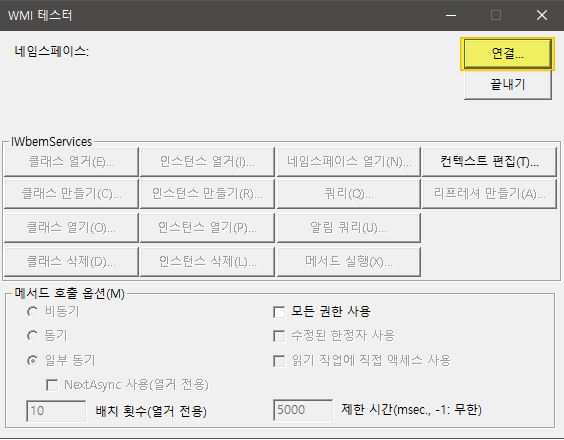
EventID:5612 Windows Management Instrumentation has stopped WMIPRVSE.EXE because a quota reached a warning value. 오류 발생 시 조치 방법 1. 시작 > 실행에서 WBEMTEST 입력 2. 연결 3. 네임스페이스에 'root' 입력 후 연결 4. 인스턴스열거 클릭 5. 슈퍼클래스 이름에 아래 클래스명 입력 후 확인 __ProviderHostQuotaConfiguration 6. 쿼리 결과에 나온 값을 더블클릭 7. HandlesPerHost 선택 후 속성편진(값이 4096인점 확인) 8. 아래 값으로 변경 8192 (0x2000) 9. HandlesPerHost 값이 8192로 변경된 점 확인 후 개체저장 버튼 클릭..

Windows EventID 2022.03.15

Windows Server 2003 sp2 다운로드

아래 경로에서 Windows Server 2003 iso 설치 파일을 다운로드 할 수 있습니다. 해당 이미지 파일은 MSDN을 통해 다운로드 받은 파일이며, 아무런 수정도 없는 순정버전입니다. CD1 drive.google.com/file/d/0B6PSBrpncDqTOHY3RE5QQXRCMzg/view?usp=sharing ko_win_srv_2003_r2_enterprise_kn_with_sp2_cd1_x13-13665.iso drive.google.com CD2 drive.google.com/file/d/0B6PSBrpncDqTZTg4LW1UT2xlQTA/view?usp=sharing ko_win_srv_2003_r2_enterprise_kn_with_sp2_cd2_x13-13677.iso drive..

Windows Server 2021.01.07

Netbackup nbwebsvc 계정 오류

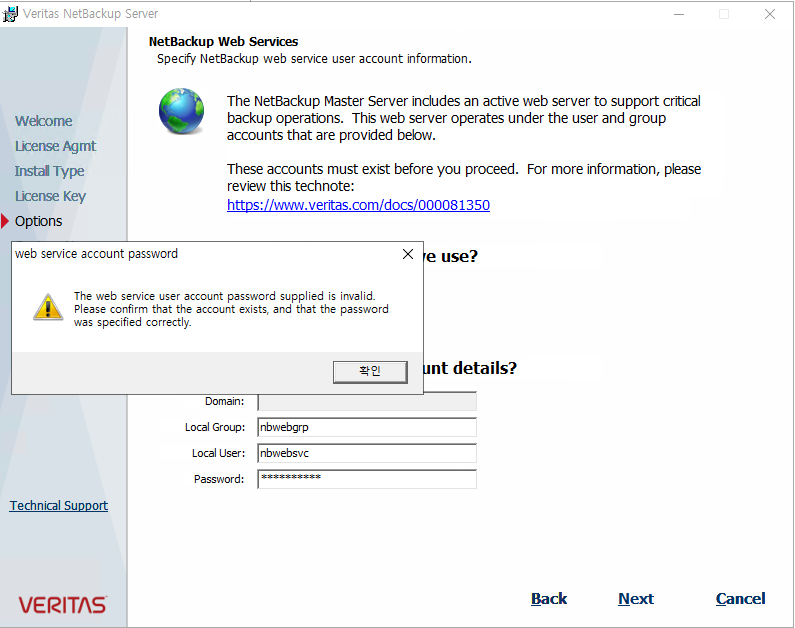
Netbackup 설치 시 아래와 같이 nbwebsvc 계정에 대한 오류가 발생 The web service user account password supplied is invalid. Please confirm that the account exists, and that the password was specified correctly. 'nbwebgrp' 그룹 생성 후 'nbwebsvc' 계정을 멤버로 추가하였음에도 오류가 발생될 때 아래와 같이 그룹정책 수정으로 조치 제공된 웹 서비스 사용자 계정 암호가 잘못되었습니다. 계정이 존재하고 암호가 올바르게 지정되었는지 확인하십시오.

Software,Tools 2020.09.16

RDCMan 개발 및 지원 중단

Microsoft에서 지난 2014년 발표한 'Remote Desktop Connection Manager'(이하RDCMan) 2.7버전을 마지막으로 20202년 3월부터 해당 어플리케이션의 개발 및 지원 중단을 발표했으며, 기존페이지에서의 다운로드도 불가능한 상태로 변경되었습니다. 다운로드 불가한 직접적인 사유는 새로운 보안 취약점 발견으로 볼 수 있습니다. 지원 및 개발 중단과 더불어 보안 취약점에 대한 패치 계획도 없다고 발표하였기에 기존 사용자는 알수없는 출처의 'rdg' 파일을 열지 않도록 주의가 필요합니다. https://portal.msrc.microsoft.com/en-US/security-guidance/advisory/CVE-2020-0765 https://portal.msrc.micr..

Software,Tools 2020.07.30

Kernel-EventTracing EVENT ID 2

Windows Server 2012 R2에 Teaming 구성이 되어 있을때 해당 오류가 발생될 수 있습니다.아래 MS Support 문서를 참고하여 조치 가능합니다. Kernel event ID 2 is logged when the MSFT_NetLbfoTeamNic class is called in Windows Server 2012 R2Applies to: Windows Server 2012 R2 DatacenterWindows Server 2012 R2 Standard Symptoms When Windows Server 2012 R2 is used with the NIC Teaming feature, and a third-party WMI provider is used to call the MSF..

Windows EventID 2018.11.01

WHEA-Logger EVENT ID 47

이벤트 뷰어에서 '자세히'를 눌러 아래쪽 'ErrorType'의 코드를 아래표와 대조하여 확인하여 원인 파악 0 An unknown error. 1 No error occurred. 2 A single bit ECC error. 3 A multibit ECC error. 4 A single symbolChipKill ECC error. 5 A multiple symbolChipKill ECC error. 6 A master abort. 7 A target abort. 8 A parity error. 9 A watchdog timeout. 10 An invalid memory address. 11 A broken memory mirror. 12 A memory sparing error.

Windows EventID 2018.11.01

PowerShell Repository 구성

PowerShell Internal Repository 구성 및 서비스 방법에 대한 포스팅입니다. PowerShell 모듈을 다운로드하기위해 PSGallery를 많이 사용하고 있습니다.하지만 인터넷 연결이 불가능한 서버들의 경우 모듈설치를 위해 인터넷이 가능한곳에서 모듈파일을 다운로드 받아 서버로 복사하여 사용하는 방법밖에 없었습니다.또한, 인터넷망의 Repository를 통해 인증/검증되지 않은 모듈을 설치 및 사용하여 여러 문제들이 발생되어 최소한 사용이 검증된 모듈들을 한곳(Internal Repository) 에 모아두고 배포하는것이 필요할수 있습니다. 이러한 문제들로인한 요구사항이 있다면, 외부에 공개되지 않은 내부 PowerShell Repository를 생성하여 서비스할 수 있습니다.내부 P..

PowerShell 2017.11.03